There is a lot of noise around AI and automation right now. Some of it suggests a small business can hand over most of its work to software. Some of it suggests the whole thing is hype. The truth for most small teams sits somewhere in the middle.
Automation is very good at certain kinds of work and quite bad at others. This article looks at where it tends to help, where it tends to cause problems, and how to get started without creating a mess.
What makes a task a good candidate
Before picking a tool, look at the work itself. Good candidates for automation usually share a few traits:
- They repeat often. A task you do twice a year is rarely worth automating. A task you do twenty times a day probably is.
- They follow clear rules. If you can explain the steps to a new hire on one page, a system can probably follow them too.
- The inputs are predictable. Form submissions, order confirmations and calendar bookings arrive in a consistent shape.
- Mistakes are easy to spot and cheap to fix. A misfiled lead can be moved. A wrong refund is harder to undo.
If a task ticks most of these boxes, it is worth a closer look. If it ticks none, it is probably better left to a person.
Lead routing and capture
For many small businesses, the first useful automation is simply making sure no enquiry gets lost. Leads arrive from website forms, WhatsApp, email, social media and phone calls, and they often end up scattered across several inboxes.
A simple setup can:
- Collect enquiries from different sources into one place, such as a CRM or a shared spreadsheet.
- Tag each lead by service, budget range or location based on what the person filled in.
- Assign the lead to the right team member and notify them straight away.
- Flag leads that have not been answered within a set time.
None of this needs advanced AI. Most of it is basic rules. AI can help with messier inputs, for example reading a free-text message and suggesting which service the person is asking about, but a person should still be able to correct that suggestion easily.
Follow-ups and reminders
Follow-ups are where small businesses often lose the most opportunities, not because people do not care, but because things get busy. Automation can take care of the remembering:
- A short confirmation message when someone submits an enquiry, so they know it arrived.
- Appointment reminders before a scheduled call or visit.
- A reminder to your own team when a proposal has been sent but there has been no reply.
- A polite check-in after a project is delivered.
Keep automated messages short, honest and easy to reply to. People can usually tell when they are reading a template, and that is fine as long as a real person picks up the conversation when they respond.
Support triage
If you get a steady flow of customer questions, AI can help sort them before a person reads them. For example, it can group messages into billing, technical issues, order status and general questions, or flag messages that sound urgent or upset.
It can also suggest a draft reply based on your existing help articles. The key word is suggest. A draft that a team member checks and sends is very different from a reply that goes straight to a customer with no review.
Simple, factual questions (opening hours, delivery areas, how to reset a password) are reasonable to answer automatically, provided the answers come from information you have written and checked. Anything involving money, complaints, health, legal matters or a frustrated customer should go to a person.
Where automation does not fit
Some work should stay with people, at least for now:
- Judgement calls. Pricing a custom project, deciding whether to take on a client or handling a dispute all depend on context that software does not have.
- Relationships. Clients want to know there is a person who understands their situation. Automating every touchpoint can make a business feel distant.
- Rare or messy tasks. If a process changes every time, the effort to automate it will likely outweigh the benefit.
- Anything where a confident wrong answer is costly. AI tools can produce answers that sound right and are not. That risk is acceptable for a first draft, and not acceptable for a final decision.
It is also worth saying that automating a broken process just makes it break faster. If the current way of doing something is unclear, fix the process first.
Keep humans in the loop
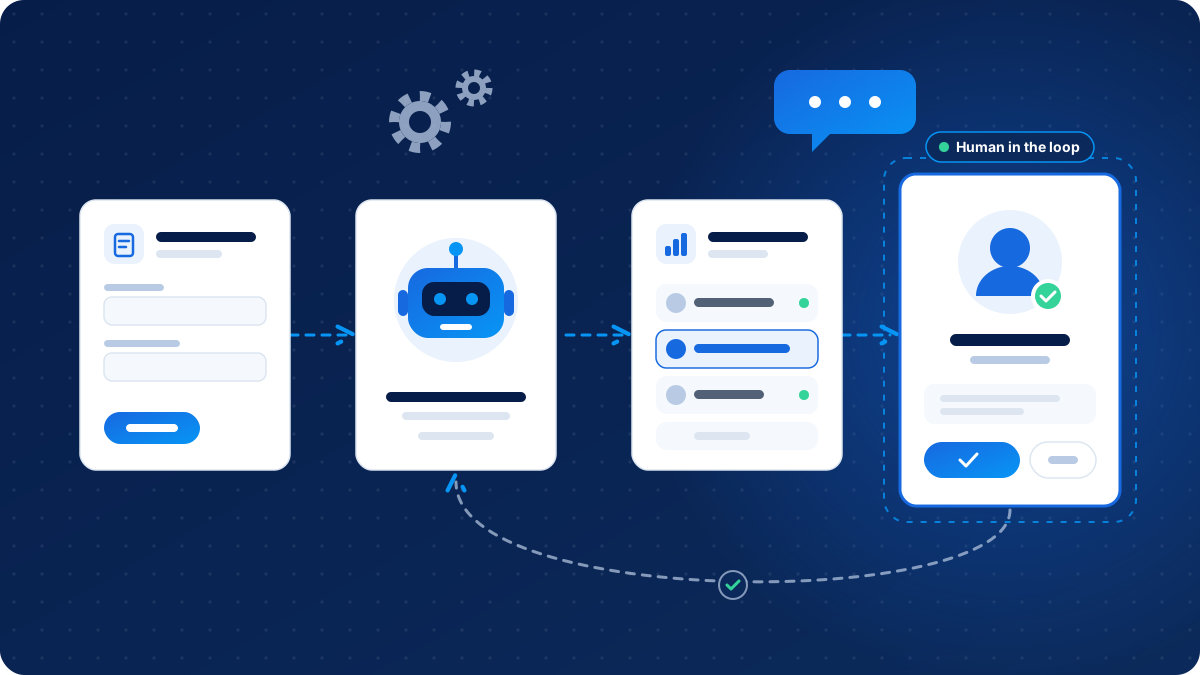
The safest way to use AI in a small business is as an assistant, not a replacement. In practice that means:
- Clear points where a person reviews and approves before anything is sent or changed.
- An easy way for customers to reach a real person at any time.
- Logs of what the automation did, so you can check and correct it.
- A named person who owns each automation and notices when it stops working.
Automations do break. An app updates, a form field gets renamed, or an API key expires. Without an owner, these failures can go unnoticed for weeks.
Think about data privacy early
Most automations move customer information from one place to another, and many AI tools send that information to a third-party service for processing. Before connecting anything, ask:
- What data is being shared, and does the tool actually need all of it?
- Where is it stored, and for how long?
- Does the provider use your data to train its models, and can you switch that off?
- Who on your team has access to the connected accounts?
- Does your privacy policy explain this to your customers?
Share the minimum needed, avoid pasting sensitive personal or financial details into general AI chat tools, and use business accounts with proper access controls rather than personal logins. Privacy rules differ between countries, so if you handle sensitive data or serve customers in several regions, get proper advice.
Start small and measure
The best first automation is usually boring. Pick one task that is frequent, simple and annoying, automate it, and run it for a few weeks. Then ask:
- Did it save time, and roughly how much?
- Did it cause any mistakes or complaints?
- Does the team trust it, or are they double-checking everything anyway?
If the answers are good, move to the next task. If not, adjust or switch it off. Small, tested steps build confidence and avoid the situation where a business has a dozen half-working automations nobody understands.
It also helps to write down what each automation does in plain language. When someone new joins the team, or when something goes wrong, that note will save a lot of guessing.
Closing thoughts
Automation and AI work best when they take care of repetitive, rule-based work and leave the thinking, the judgement and the relationships to people. Start with one clear problem, keep a person in charge of the result and treat customer data with care. If you would like help working out where automation fits in your own business, OzTechVerse can talk it through with you.